
Mobile Passport Control (MPC): US Immigration App
Mobile Passport Control speeds up your passage through US immigration. Here's how the app works and who can use it.
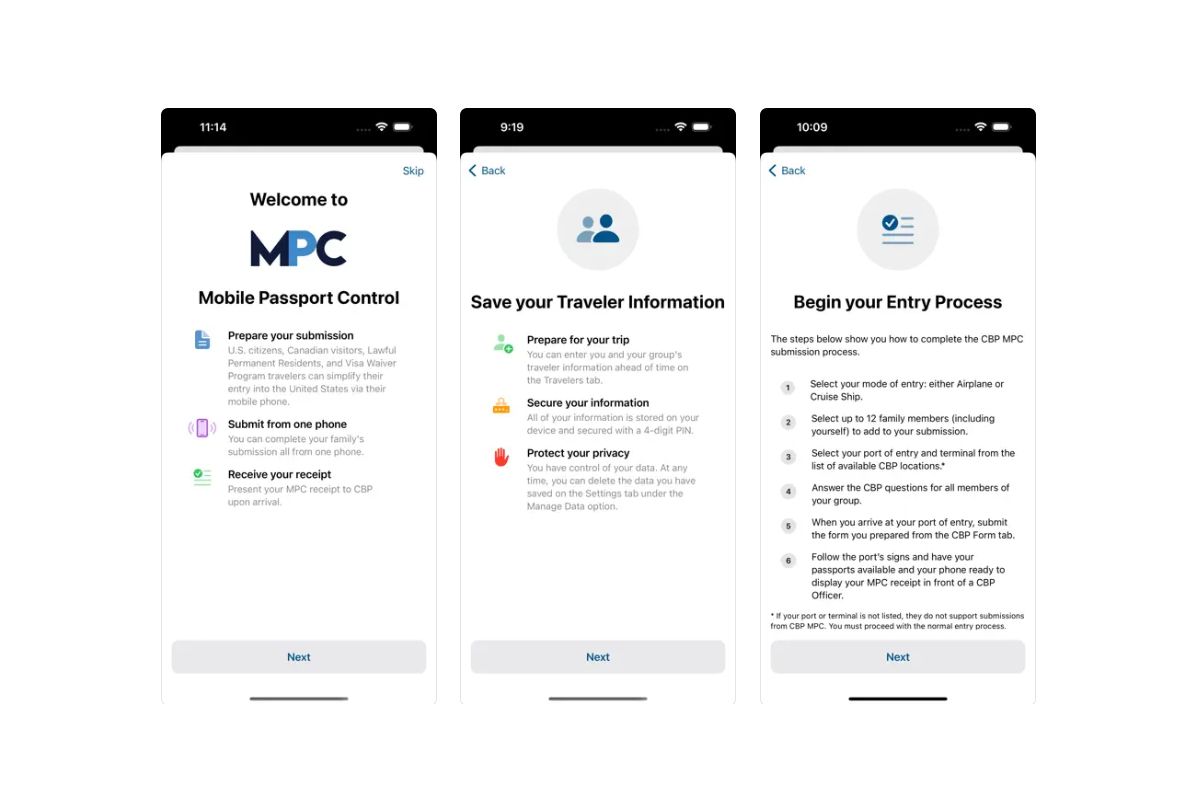
What is the Mobile Passport Control (MPC) app?
- Mobile Passport Control (MPC) is a system launched in 2022 by US Customs and Border Protection. It’s straightforward: passengers who use this app can access a dedicated, faster immigration line when arriving in the United States.
- MPC is available to US citizens, Canadian visitors, permanent residents, and since 2024, travelers in the visa waiver program—including Europeans entering the US with an ESTA. Important: you cannot use MPC on your first visit to the United States.
- If you’re traveling to the US with an ESTA and have visited before, you can use MPC to skip long immigration lines. The app is free.
- MPC works at 46 US entry points, including 33 international airports. These include New York JFK, Newark, Miami International Airport, Los Angeles International Airport (LAX), San Francisco International Airport, and Toronto Pearson International Airport for those transiting through Canada. See the full list below.
- Important: MPC does not replace your ESTA requirement. It only speeds up immigration processing. You must still complete US entry requirements and follow the ESTA application process.
How to use the Mobile Passport Control (MPC) app
Here’s how to use Mobile Passport Control step by step. Follow these steps before your trip to the United States:
- Download the Mobile Passport Control (MPC) app to your phone. For Apple devices, find it on the Apple Store. For Android, go to Google Play.
- Open the app and answer the questions by clicking “New Submission”. First, select your mode of transport: plane or cruise ship. Choose your “CBP Port”—your arrival location. If you’re arriving at New York JFK, select JFK and check your terminal. Then click “Proceed”.
- Select how many people are traveling with you. They must be family members. You can register up to 12 family members, including yourself, in the app—useful for family trips.
- For each person, create a profile by clicking “Create New Traveller”. Specify your travel document type. If you’re European traveling with an ESTA, click “Visa Waiver Program Passport” and select “Proceed”. Enter your name, then create a 4-digit PIN and remember it.
- Answer 6 customs-related questions. The first asks if you’re carrying commercial merchandise—answer “no” if you’re not. The second asks if you have $10,000 or more in currency. The third asks about items to declare. The fourth asks about fruits, vegetables, or plants. The fifth asks if you’ve had contact with livestock or visited a farm. The sixth asks if you’re carrying biological material.
- Indicate your reason for visiting the US. Choose WB (Waiver Business) or WT (Waiver Tourist). For a vacation week in New York, select WT. Then click “Proceed”.
- Review your answers to make sure everything is correct. If all is accurate, check the box confirming your information is correct, then click “Save CBP Form”.
How immigration processing works with the MPC app
Once you arrive in the United States, follow these steps:
- Upon arrival, open the app and confirm you’ve reached your designated entry point. Then follow the app’s process to complete immigration and customs procedures.
- Take a selfie with your phone. If traveling with family, photograph each family member, including children. Once complete, submit the form. You’ll receive a QR code valid for 4 hours.
- Head to the Mobile Passport Control (MPC) line. If an officer asks where you’re going, tell them you’ve completed MPC. Note: “MPC” is pronounced “em-pee-see” in English.
- Present your passport and QR code to the immigration officer. The officer will review your information and ask standard questions. See common US immigration questions. A passport stamp and you’re in!

Our MPC tutorial

Frequently asked questions
Can I use Mobile Passport Control on my first visit to the US?
No, you cannot use MPC on your first US visit. This was possible until summer 2026, but the app was updated and now requires a previous entry to the US. On your first visit, use the standard immigration line. MPC becomes available starting with your second trip to the US.
What is the minimum age to use the Mobile Passport Control (MPC) app?
You can create an MPC profile for any traveler, regardless of age. For families, create profiles for parents and each child by entering their names. There’s no age restriction.
Can I use MPC with a visa?
No, MPC is not available for travelers entering the US on a visa. You must use the standard immigration line.
Which airports accept the MPC app?
Here’s the list of airports accepting MPC, both in the US and at foreign airports with US agreements:
- Abu Dhabi Zayed International Airport (AUH)
- Atlanta Hartsfield-Jackson International Airport (ATL)
- Aruba Queen Beatrix International Airport (AUA)
- Bermuda L.F. Wade International Airport (BDA)
- Baltimore/Washington International Thurgood Marshall Airport (BWI)
- Boston Logan International Airport (BOS)
- Calgary International Airport (YYC)
- Charlotte Douglas International Airport (CLT)
- Chicago O’Hare International Airport (ORD)
- Dallas/Fort Worth International Airport (DFW)
- Denver International Airport (DEN)
- Dulles International Airport (IAD)
- Dublin Airport (DUB)
- Edmonton International Airport (YEG)
- Fort Lauderdale-Hollywood International Airport (FLL)
- Halifax Stanfield International Airport (YHZ)
- Honolulu Daniel K. Inouye International Airport (HNL)
- Houston George Bush Intercontinental Airport (IAH)
- Houston William P. Hobby International Airport (HOU)
- John F. Kennedy International Airport (JFK)
- Kansas City International Airport (MCI)
- Las Vegas Harry Reid International Airport (LAS)
- Los Angeles International Airport (LAX)
- Miami International Airport (MIA)
- Miami Seaport
- Minneapolis-Saint Paul International Airport (MSP)
- Montreal Trudeau International Airport (YUL)
- Nassau Lynden Pindling International Airport (NAS)
- Newark Liberty International Airport (EWR)
- Oakland International Airport (OAK)
- Orlando International Airport (MCO)
- Ottawa International Airport (YOW)
- Palm Beach Seaport
- Philadelphia International Airport (PHL)
- Phoenix Sky Harbor International Airport (PHX)
- Pittsburgh International Airport (PIT)
- Port Everglades Seaport
- Portland International Airport (PDX)
- Sacramento International Airport (SMF)
- Salt Lake City International Airport (SLC)
- San Diego International Airport (SAN)
- San Francisco International Airport (SFO)
- San Jose International Airport (SJC)
- San Juan Airport (SJU)
- San Juan Seaport
- Seattle-Tacoma International Airport (SEA)
- Shannon Airport (SNN)
- Tampa International Airport (TPA)
- Toronto Pearson International Airport (YYZ)
- Vancouver International Airport (YVR)
- Winnipeg James A Richardson International Airport (YWG)